 Back
Back
Raiffeisen Bank
Case study
From manual setup to an AI-generated workspace
Project & role
Raiffeisen Bank was developing its own trading terminal for asset managers and brokers, with a target audience of more than 500 institutional clients.
In 2025, as Lead Product Designer, I spent over six months designing the terminal from scratch. I interviewed portfolio managers and traders, designed the main screens and workflows, and prepared the widget behaviour, interface states and layout rules for development.
The challenge
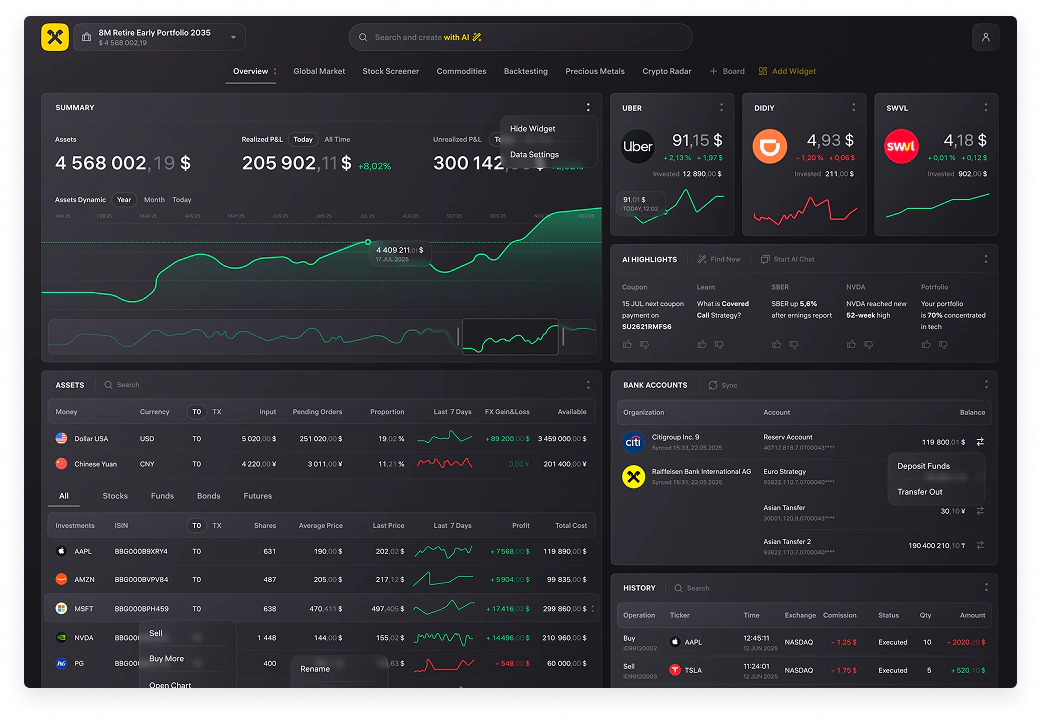
The bank was building its own terminal as part of its strategy to reduce dependence on external vendors. In the version of QUIK used by the bank, switching between portfolios took a long time and access to bank accounts was limited. Manual widget and board setup also complicated daily work. Necessary changes depended on the external provider and could take a long time.
The terminal needed to combine portfolio holdings and performance, banking accounts and tools for portfolio managers and traders making decisions or executing instructions.
The bank also wanted AI in its products. In the terminal, AI needed to support daily work within legal constraints while keeping trading decisions with the user.
Research & process
Together with the Product Owner, I interviewed around 20 portfolio managers and traders. I reviewed their QUIK workflows and observed their work with portfolios and orders. The priorities were portfolio switching and banking-account access. Users spent time manually building boards: finding securities, recalling tickers, and adding and configuring widgets. I also conducted around 10 video-recorded observations of portfolio managers at work.
I used the findings to design workflows and discussed solutions with users in interviews. Participants completed the same task in QUIK and the new interface to compare the experience. Each widget was tested with several portfolio managers and traders.
The solution
Portfolios, accounts and trading
I designed the workspace for the following tasks:
- Switch portfolios and review value, holdings and financial performance across periods and chart points.
- Review cash, stocks, funds, bonds and futures using search and categories.
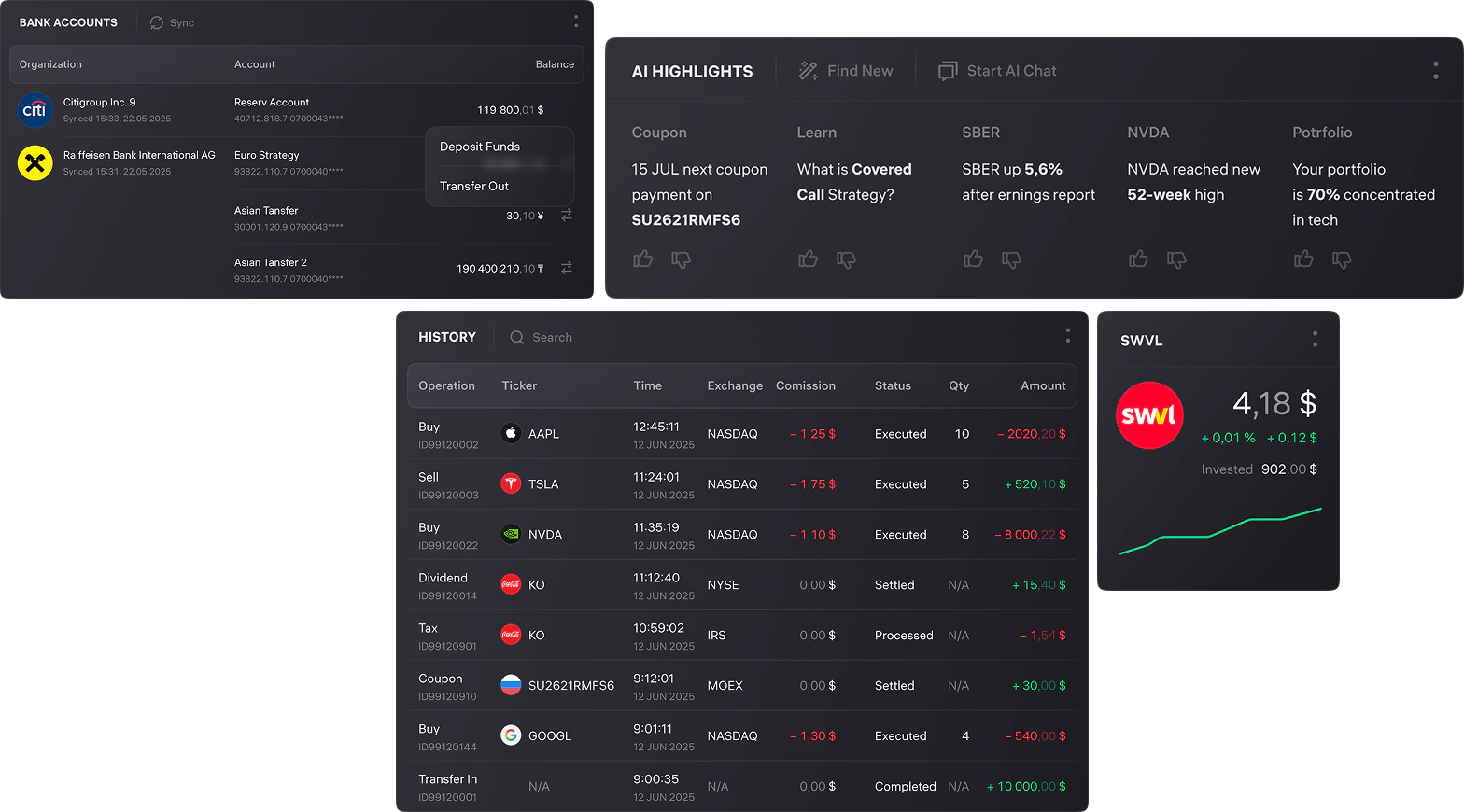
- See account balances and update times, fund accounts or withdraw, and choose an account and portfolio when buying securities.
- Place buy and sell orders: choose an account, portfolio, instrument, quantity, price and order type.
- Monitor execution: view active, partially filled and completed orders, and amend or cancel the unfilled portion.
- Rebalance a portfolio by reviewing asset weights and adjusting holdings through purchases and sales.
- Review trades, dividends, coupons, taxes and transfers, including amounts, fees and statuses.
- Find instruments by name or ticker, distinguish trading venues, and open company information or charts.
Portfolio-aware AI Highlights
I designed AI Highlights, a panel of facts, news and events for the selected portfolio without buy or sell prompts. Useful/not-useful ratings were intended to gradually tailor the mix of company news and portfolio-composition information.
One AI assistant, three types of tasks
A single assistant field supported three groups of tasks:
- Market: find securities, explore an instrument or compare options.
- Portfolio: ask questions in ordinary language, such as dividend income or holdings below 1% of portfolio value. Answers could include a breakdown and an Excel file.
- Workspace: create widgets and entire boards through AI, then customise them for the task.
A contextual suggestion strip adapted to the query. For example, entering “Apple” brought up questions about price movements and valuation, similar securities, and adding a card to a thematic board.
Setting up the workspace
Users could preview a widget, choose its card layout, confirm the addition and position it on a board. We developed templates for new boards together with portfolio managers. Users could rename, duplicate or delete boards, hide widgets and open their data settings.
Text requests worked alongside standard buttons and menus.
Outcomes
- AI-generated widgets: estimated ~4× faster workspace setup than QUIK, based on same-task observations.
- Portfolios, accounts and trading in one workspace.
- An in-house alternative to QUIK, designed to reduce vendor dependence.
Team feedback
He successfully demonstrated a wide range of capabilities: from developing existing products to launching new services from scratch…
He successfully demonstrated a wide range of capabilities: from developing existing products to launching new services from scratch. He offered fresh conceptual design solutions and scalable approaches…

Behind the scenes
Completing the interface
The design also covered login and QR-based access, appearance options, contextual menus and supporting states.
Design leadership
Alongside hands-on terminal work, my wider role included design direction across more than five investment tools. I mentored five designers across two product teams, ran design reviews and one-on-ones, and supported hiring.
Working with AI tools
I also used LLM tools to help prepare research, organise findings and explore early ideas.


